One of my customers re-created the data guard broker configuration, but he faces the following errors while adding the standby database:
ORA-16778 and ORA-12514
Environment:
Primary:
- ORACLE_SID=proddb1
- ORACLE_BASE=/u01/app/oracle
- PS1=$PWD<$ORACLE_SID>
- ORACLE_HOME=/u01/app/oracle/product/19.3.0.0/db_home4
Standby:
- ORACLE_SID=proddb1
- ORACLE_BASE=/u01/app/oracle
- PS1=$PWD<$ORACLE_SID>
- ORACLE_HOME=/u01/app/oracle/product/19.3.0.0/db_home4
The Standby database is configured correctly and is receiving and applying logs from the primary database, no gaps (still he didn’t create the broker configuration):

Data Guard Broker Configuration Creation:
DGMGRL> CREATE CONFIGURATION dr_proddb AS PRIMARY DATABASE IS proddb_primary CONNECT IDENTIFIER IS prodDB_primary_DG;
Configuration “dr_proddb” created with primary database “proddb_primary”
DGMGRL> ADD DATABASE proddb_stdby AS CONNECT IDENTIFIER IS prodDB_stdby_DG MAINTAINED AS PHYSICAL;
Error: ORA-16796: one or more properties could not be imported from the member
Failed.
DGMGRL> ADD DATABASE proddb_stdby AS CONNECT IDENTIFIER IS prodDB_stdby_DG ;
Error: ORA-12514: TNS:listener does not currently know of service requested in connect descriptor
Failed.
Review the DR Log file:
ADD DATABASE
2023-09-08T23:52:03.309-04:00
Failed to connect to remote database proddb_stdby. Error is ORA-12514
Failed to send message to member proddb_stdby. Error code is ORA-12514.
Failed to connect to remote database proddb_stdby. Error is ORA-12514
Failed to send message to member proddb_stdby. Error code is ORA-12514.
2023-09-08T23:53:11.446-04:00
Failed to connect to remote database proddb_stdby. Error is ORA-12514
Failed to send message to member proddb_stdby. Error code is ORA-12514.
Error: importing database setting from the remote site failed: err=12514 lvl=1 db=”proddb_stdby” cid=”proddb_stdby_dg”
2023-09-08T23:54:20.726-04:00
Failed to connect to remote database proddb_stdby. Error is ORA-12514
Failed to send message to member proddb_stdby. Error code is ORA-12514.
Error: importing database setting from the remote site failed: err=12514 lvl=2 db=”proddb_stdby” cid=”proddb_stdby_dg”
ADD DATABASE completed with error ORA-16796
2023-09-09T00:08:25.944-04:00
ADD DATABASE
2023-09-09T00:08:29.431-04:00
Failed to connect to remote database proddb_stdby. Error is ORA-12514
Failed to send message to member proddb_stdby. Error code is ORA-12514.
ADD DATABASE completed with error ORA-12514
I tried to connect to the standby database from the primary using the above TNS string:
sqlplus sys/xxxxx@prodDB_stdby_DG as sysdba
I also received ORA-12514 error
Review the tnsnames.ora file
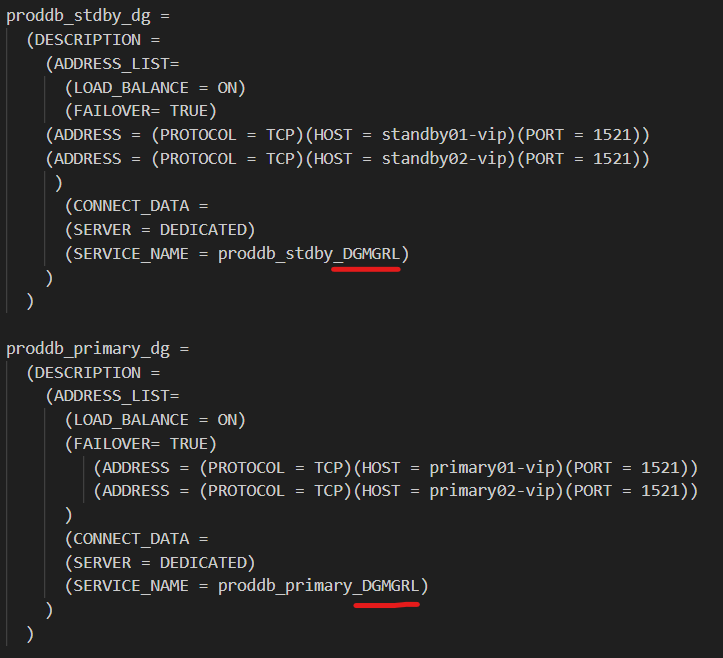
Connect strings are containing wrong service name with _DGMGRL suffix, I removed the _DGMGRL suffix from the these TNS entries in both primary and standby.
Now, I can connect as sys using the above TNS strings from both nodes using sqlplus
Let us try again to add the standby database to the configuration:
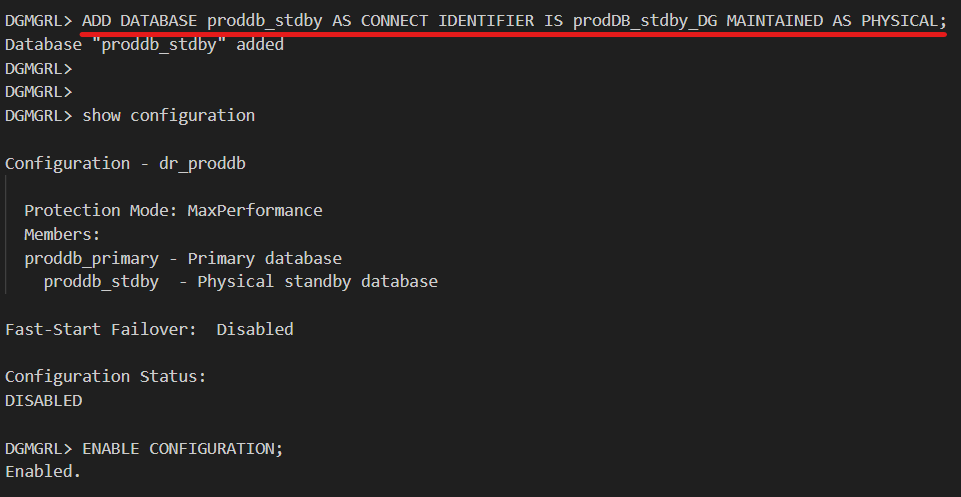
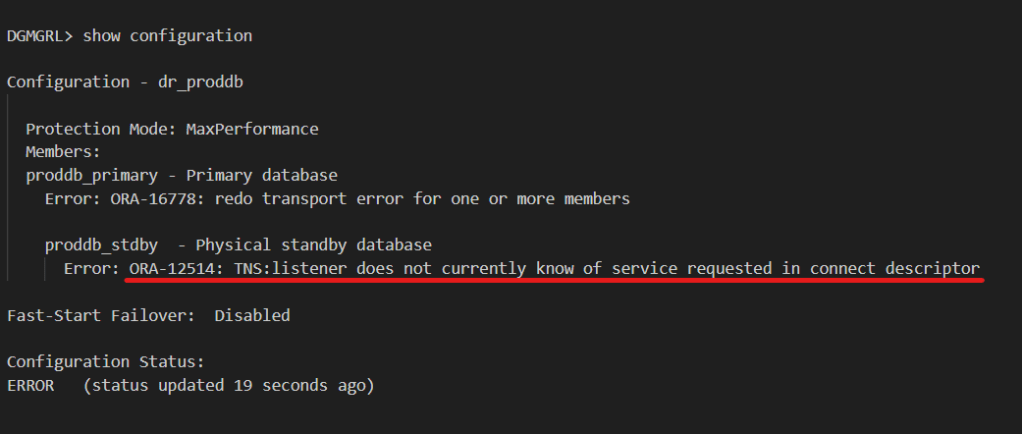
Wait couple of moments:
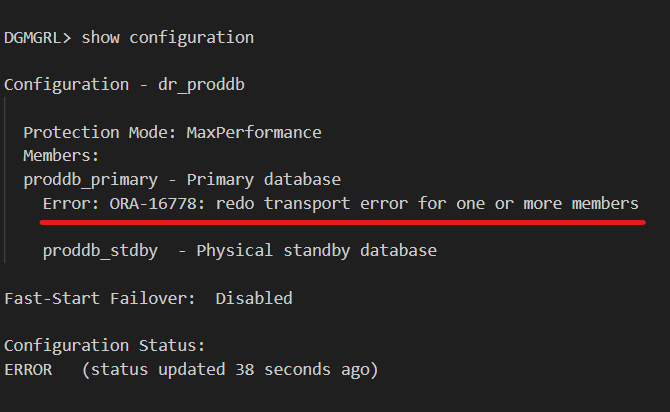
I decided to modify the TNS entries in the tnsnames.ora to use the scan name instead of the node(s) virtual IPs as follows:
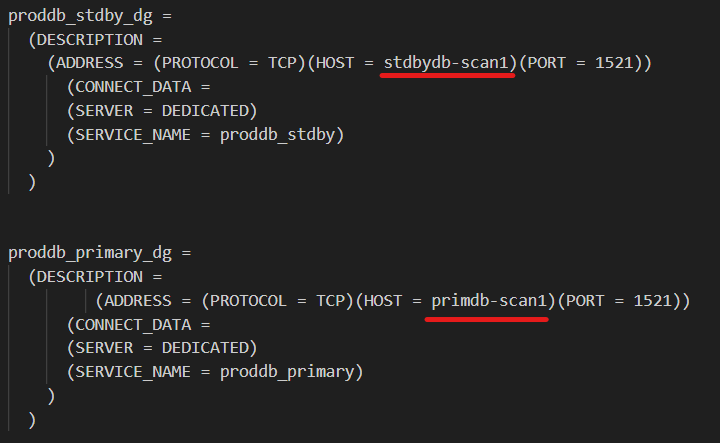
Copy the above TNS entries to the four nodes of the primary and Standby (all instances, don’t forget that)
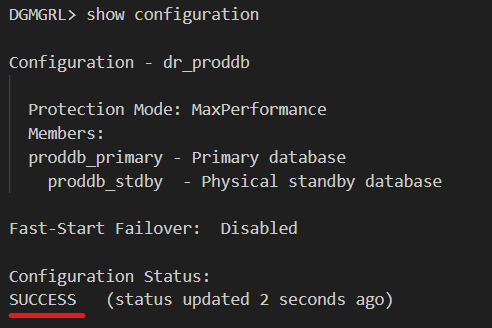
This change fixed the issue, now we have a successful configuration:
Final Remarks:
If you want to use the Virtual IP format, you need to statically register the databases in the listener.ora file with _DGMGRL suffix (which was not there in this case).
If you are using the scan name on the above connect strings proddb_stdby_dg & proddb_primary_dg, you don’t need the static listener entries that ends with _DGMGRL (they should be removed, if exist).
 Ahmed AbdelFattah Blog !