I have a couple of old (but important) virtual machines, that I run from time to time when I deliver a specific workshop.
I didn’t run these machines since couple of months. During this time I got my new laptop, which is more powerful than the old one.
My Old Laptop specs:

My New Laptop specs:

Today, I tried to start these virtual machines, but I got the following errors:

WARNING calibrate_APIC_clock: the APIC timer calibration may be wrong
Kernel panic – not syncing: Fatal exception
I tried many solutions/workarounds proposed in many sources in internet without luck, like:
Ensure that the Hyper-V feature is disabled:

Start the virtual machine by one of the following options:
noapic or pnpbios=off or noioapic or ioapic=off or nolapic
All of them didn’t succeed.
I tried to reduce the VM’s assigned memory from 5GB to 1GB or/and reduce number of processors to one instead of two ==> Same issue
I tried to change the VM’ configuration chipset from PIIX3 to ICH9 ==> same issue
I tried to de-select the “Enable I/O APIC” VM’s option ==> Same issue:

Before giving up, I tried the disable also the following windows feature, and it fixed my issue:
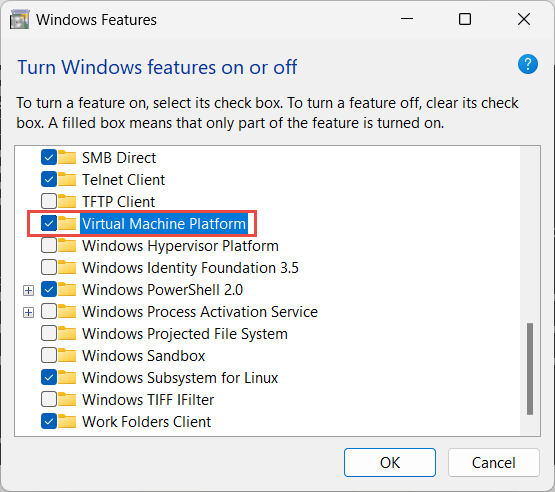
So, the final solution that worked in my case is to disable the windows feature “Virtual Machine Platform”. Now, I can start my VM successfully:

I hope this will help someone stucked in the same issue.
Thanks
Ahmed
 Ahmed AbdelFattah Blog !