Although I feel (or claim) that I know how the FRA is working and I know much about the FRA mechanics,
encountering FRA space issues consistently leads me to discover new insights and learn something new (very new).
What was the issue?
The Archiving process stopped working due to space shortage in the +FRA Disk Group.
When did it happen?
Last issue time: Wednesday 28-Feb-2024 around 7am.
It happened couple of days before that date, fixed, but without being able to reach/identify the root cause.
What is happening during the issue?
End users are receiving errors from Application similar to the following one:

From Database Side, DBA can see many errors similar to the following error in the database alert.log file:

What is the reason behind this issue?
It is very clear from the above errors that the archival process is not able to find space in the FRA disk area to archive the current online redo log file. This is the top-level issue (but not the root cause of the issue).
The quick Fix
When we face this type of issues, our main concern is to fix it very quickly to enable the database and application to continue working without any delays, after that we can continue investigating the root cause of the issue ad monitor the efficiency of any applied solutions.
And this is what was actually happened, I login to the oracle rman and tried to delete any obsolete files to free some space:
delete noprompt obsolete;
This quickly freed some space at the FRA area, and the database was able to continue archiving and the application started to work normally.
But again, the question is: what is the root cause of this issue? And how to avoid it in the future?
Let u start by some definitions
What is FRA area?
The Fast Recovery Area (FRA) in Oracle Database serves as a crucial component for data recovery.
Purpose of FRA:
The FRA is a unified storage location that houses all Oracle Database files related to recovery.It enables rapid backups for recent data, reducing the need to retrieve backup tapes from system administrators during recovery operations.
What’s Stored in FRA:
The FRA contains the following files:
RMAN backups: These are essential for data recovery.
Archive logs: Crucial for point-in-time recovery.
Control file automatic backups: Necessary for database restoration.
Database copies: Used in recovery processes.
RMAN (Recovery Manager) automatically manages files within the FRA by deleting obsolete backups and archive files no longer needed for recovery based on retention policy.
The fast recovery area is enabled by setting DB_RECOVERY_FILE_DEST_SIZE, In our case:

Some Analysis?
What was the FRA consumption when the issue happened? Let us see:


So, the FRA consumption was about 13% of the total space, so, we shouldn’t have any issue, correct?
Let us drill down more in the above numbers.
The space used by backups and archive logs is 560GB out of the 700GB allocated for the FRA.
But this (560/700) is 80% utilization , not 13%.
Yes, but remember that out of this 560GB, there is 470GB reclaimable space (obsolete backup files that can be deleted by oracle as it is no longer needed to recover the database), that is why the utilization is 13%.
But the question is, when does Oracle delete these files?
Actually, Oracle doesn’t immediately delete these files, Oracle deletes these files when there is a space shortage, i.e., when Oracle is very close to consume the whole FRA space assigned to it (in our case it is 700GB).
This is good, but why Oracle didn’t delete these files when the issue happened?
The quick answer is: from Oracle Prospective, Oracle is still having 700GB-560GB=140GB free space, so, there is no need to delete the obsolete files, but is this pace (140GB) is actually free on the storage side?
The answer was No.
From Oracle-side, I see that I’m still having 140GB free on my quota, so, there is no need to delete the obsolete files.
From storage-side, I don’t have that space actually available at the time of issue!!!!!!
And that is why the issue happened.
But, why do oracle and O.S. have different prospective?
Let see the image again after, I deleted the obsoleted files to quickly fix the issue, and allow end users to continue working.

To complete the image, we need to examine the space utilization from the storage (O.S.) prospective also:

+FRA Disk group size = 1024 GB
+FRA free space = 583 GB
FRA (Oracle consumption) = 86GB
So, from oracle-side, the +FRA free space should be = 1024GB – 86 GB = 938 GB (not 583 GB)!!!!
So, we have a difference of (938 – 583 = 355 GB) between Oracle & O.S. prospective !!
What is reason behind this difference? Where is it consumed?
Another Example & the Root Cause:
Let us investigate the numbers at another moment?


Let us see the breakdown of the +FRA disk group:


If we see the backupset folder:
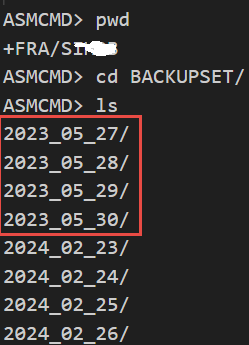
It is very clear that there are old backups that are outside the control file keep time (15 days):

Same, for archive log files, I found folders starting from 10-Jan-2024 till end of Feb-2024, Control file is not aware of all of these files.
This is happened, when the backup files started to be old and exceeded the control_file_record_keep_time value, after that the database (control file & rman) will not be aware of these files, although it is still there in the operating system storage, and actually this is the root cause of the current issue.
The root cause of the issue is when some obsolete backup files are not deleted within the 2-weeks. Control files keeps the backup history for two weeks. After that time these files will be existing at the storage, but oracle database is not aware of it, and it will start consuming some space at the +FRA disk group, that is actually assigned to the Oracle FRA area.
Final Fix:
- Ensure always that the +FRA storage has free space more than that of the Oracle FRA.
- The key point is that the obsoleted files should be reclaimed either automatic or manually before passing the control_file_record_keep_time value, otherwise it will be residual files (exist on the storage, but outside the control of Oracle)
- I deleted all the old backups and archives.
- Also, I increased the FRA quota from 700GB to 800GB
- Also, I changed the archive log daily backup format from “FILE COPY” to backupset.
For additional safety, we may (optionally) implement the following changes in the near future:
- Increase the control_file_record_keep_time to 30 instead of 15 to keep more backup information.
- Implement a weekly job to manually delete the obsolete backup files.
- or we may just modify the weekly full database backup job to delete the obsolete backup files.
- Or configure the database with a Recovery Catalog to hold the backup information longer.
So, the key point is to ensure that the control file holds backup information longer than:
1- The time needed to trigger an automatic deletion for the obsolete files ( you may need to decrease the FRA size not to increase it, to trigger it more frequently).
2- or longer than the time that you usually delete the obsolete files manually.
Thanks
Ahmed
 Ahmed AbdelFattah Blog !