This is one of the difficult situations for any Oracle DBA, where you may receive wrong/conflicting messages from the end users, you may need to run many commands, examine many lengthy trace files, cooperate with other team members, contact vendor support teams.
Yesterday, I got a complaint that the database/application is running very slow.
I connected to the database servers to analyze the issue, and it was a surprise that the DB & Cluster services are down on node2.
(This is a 2-node Oracle 19c RAC environment running on IBM AIX 7.2)


I was very lucky, as the first thing that I checked turned out to be the root cause of the issue:

So, it is very clear that the /opt file system is 100% utilized, but who is consuming this file system?
I drilled down into this filesystem, and I found that there is a subdirectory called (/opt/nmon/nmon_logs) that consumes most of the /opt space
NMON is a monitoring utility that you may configure to record O.S statistics in output files.
It looks like that you configure it to record these files under /opt which is not a right setup, as /opt is a small system partition (about 6GB), and these logs may eat this space very quickly.
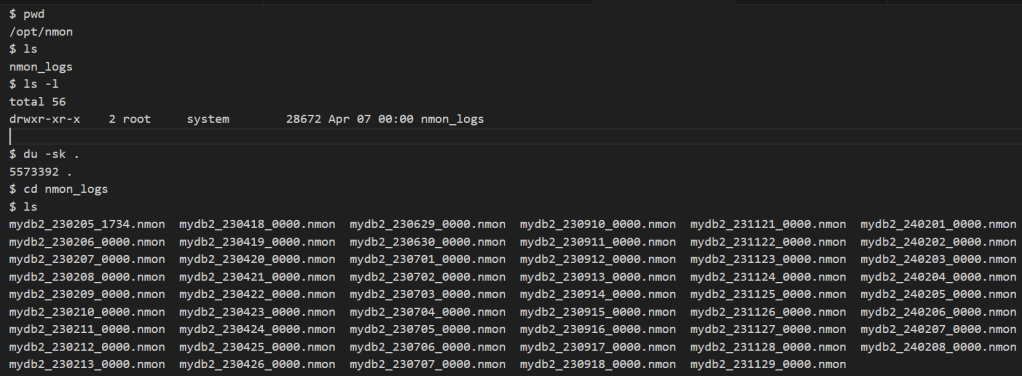
I tried to delete these logs, but I don’t have the root password (I was connected as oracle user).
I asked the O.S. team for the root password, but there was another surprise!
They told me that there is an issue with the root password on node 2.
They changed it (as with the other nodes), but when using it, they received incorrect password error !.
I asked them to take it forward with the OS Support Vendor & IBM support team to:
– reset the root password
– stop the nmon service across all nodes.
It looks like the OS support vendor was not able to fix the issue.
(Issue is linked with a storage issue that is there since the storage migration from IBM to Pure Storage).
They raised a ticket with IBM.
They was able to reset the root password on Node2.
They deleted the nmon logs and stopped the nmon service on all nodes.
Now, we are able to bring the cluster and cluster services online.
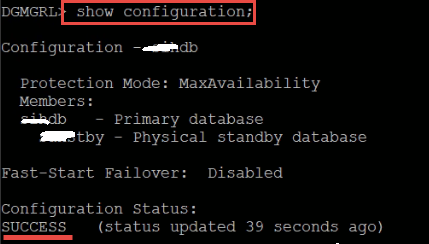
Please note that, while this issue was there, the DR site was working fine, and fully synchronized with the primary site, and it was one of the discussed solution options to switchover to the DR site, if it takes longer time to fix the issue:
 Ahmed AbdelFattah Blog !